Introduction
If you are already using Ola’s maintenance script (you should if you don’t) to facilitate SQL Server routine maintenance on your private or public cloud (Azure VM/AWS EC2/GCP CE), you are familiar with Ola’s Maintenance. In a nutshell, Ola’s Maintenance Solution allows for a few easy steps to complement SQL Server installation with routine basic maintenance tasks – backups, corruption checks, and index and statistics.
The following blog assumes that you are using Ola Hallengren maintenance scripts and going to offer a solution to complement Ola’s backup retention process by removing orphan database backup files.
Problem
Ola’s maintenance script handles DatabaseBackup procedure handles both database backups and retention in the same run. It could run Full, Diff, and Log database backups while also applying database backup file retention (via CleanupTime and CleanupMode). The first defines what to delete, while the latter defines when to delete it.
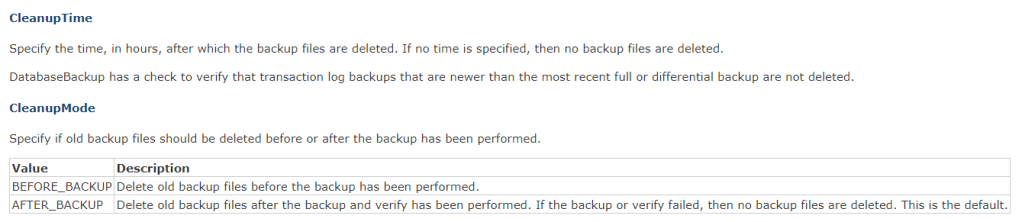
While Ola’s DatabaseBackup process is generally flawless, it does fall short in one fairly common scenario. Deletion of old database backup files works as long as you have an actual database to run backups on. If you drop a database, those previously made database backup files will stay forever.
This is mostly due to Ola’s combination of using the same procedure to back up the database as well as to delete old database files. Once the process doesn’t have a database to back up, it will not be able to delete those orphan database backup files.
Solution
The following solution on GitHub will take advantage of master.dbo.xp_delete_file (to only remove database backup bak and trn files), and master.sys.xp_delete_files (to remove empty folders) to make it happen.
https://github.com/steverezhener/DBA/blob/master/Procedures/bestpractices.usp_remove_server_database_orphan_backup_files.sqlDISCLAIMER
This blog post is based on the following resources:
https://www.sqlservercentral.com/blogs/how-to-use-xp_delete_file-to-purge-old-backup-files
 DataSteve