
Introduction
The primary benefits of ADR are:
- Fast and consistent database recovery Long-running transactions don’t affect the overall recovery time, enabling fast and consistent database recovery irrespective of the number of active transactions in the system or their size.
- Instantaneous transaction rollback Transaction rollback is instantaneous, irrespective of the time that the transaction has been active or the number of updates that have been made.
- Aggressive log truncation The transaction log is aggressively truncated, even in the presence of active long-running transactions, which prevents it from growing out of control.
Problem
Enable ADR
Solution
Step #21 in the NormalizeNewDatabaseConfig Job
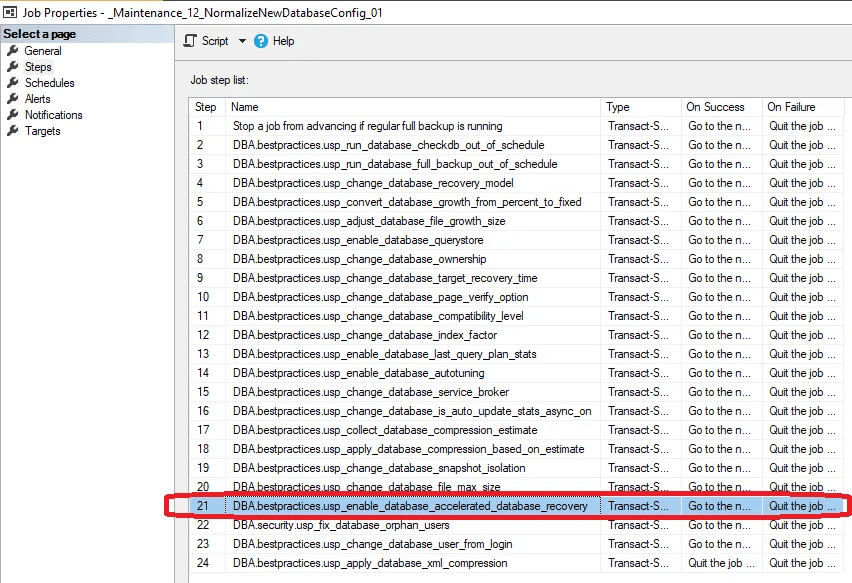
Check for not enabled ADR
SELECT nameFROM master.sys.databasesWHERE 1=1AND database_id > 4AND is_read_only = 0AND state_desc = 'ONLINE'AND user_access_desc = 'MULTI_USER'AND compatibility_level >= 150AND is_accelerated_database_recovery_on != 1
Check which databases will have ADR checked and enabled
SELECT SettingValue FROM [DBA].[maintenance].[Configuration] WHERE 1=1 AND [SettingName] = 'is_database_accelerated_database_recovery_on_databaselist'
Add and set the configuration for ADR
IF NOT EXISTS(SELECT SettingValue FROM [DBA].[maintenance].[Configuration] WHERE 1=1 AND [SettingName] = 'is_database_accelerated_database_recovery_on_databaselist')INSERT INTO [DBA].[maintenance].[Configuration] ([SettingName],[SettingValue]) VALUES ('is_database_accelerated_database_recovery_on_databaselist','')UPDATE [DBA].[maintenance].[Configuration] SET [SettingValue]='%,-DWConfiguration,-DWDiagnostics,-DWQueue' WHERE [SettingName]='is_database_accelerated_database_recovery_on_databaselist'
Based on
 DataSteve